Posts

CIM(Configuration and Installation Manger) Setup. Step -2 ServerInstance-Configuration. (ATG 10.2)

ATG Requires Database to startup. Its not the CRS(Commerce Reference Store) that we are setting along with CIM requires DB as there are Products information needs to be persisted. Its ATG Platform that requires database. Check the Sql directory in DAS, DSS, DPS,DCS Modules. After Setting up ATG related Schemas through ATG CIM in step1 we Now do the next step. If Not Please DO the Step-1 ( CIM(Configuration and Installation Manger) Setup. Step -1 DataBases Setup. (ATG 10.2) ). =================================================================== C:\ATG10.2_New\ATG10.2\home\bin>cim.bat Application Server: jboss The following installed ATG components are being used to launch:   ATGPlatform version 10.2 installed at C:\ATG10.2_New\ATG10.2 Nucleus running      Oracle ATG Web Commerce Configuration Installation Manager =======CIM MAIN MENU=============================================== enter [h]elp, [q]uit to exit Choose the task you want to...
CIM(Configuration and Installation Manger) Setup. Step -1 DataBases Setup. (ATG 10.2)

Below are The different Steps that are included when setting the Databases Using ATG. C:\ATG10.2_New\ATG10.2\home\bin>cim.bat Application Server: jboss The following installed ATG components are being used to launch:   ATGPlatform version 10.2 installed at C:\ATG10.2_New\ATG10.2 Nucleus running      Oracle ATG Web Commerce Configuration Installation Manager =======CIM MAIN MENU============================================== enter [h]elp, [q]uit to exit Choose the task you want to perform:  *[R]  Set the Administrator Password   [W]  Quit without setting password  > Please enter the value you wish to use as the Administrator password. This password will be set for all instances created by the CIM tool. Passwords should adhere to the following guidelines... * passwords should be at least 8 characters long * passwords should contain at least one upper case and one lowercase character * passwords sh...

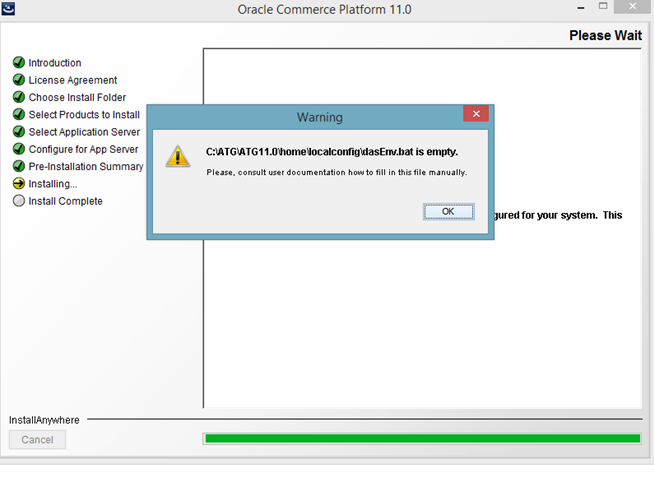
Error dasEnv.bat is Empty or CIM doesnt startup with ATGJRE issue.

Image
During ATG 11 Installation you may get this error. C:\ATG\ATG11.0\home\localconfig\dasEnv.bat is empty. ScreenShot : Just Navigate to specified directory, Open the dasEnv.bat file and fill in the below contents. set ATGJRE=C:\stuff\jdk1.7.0_55\bin\java set JBOSS_HOME=C:\stuff\jboss-eap-6.1.0\jboss-eap-6.1 set JBOSS_VERSION=6.1 For Weblogic : set ATGJRE=C:\Program Files\Java\jdk1.8.0_91\bin

Prequisites for ATG 11

Navigate to http://edelivery.oracle.com and download ATG 11. In my case Iam using Windows 8 and 64 bit OS. So i Have downloaded the supporting software. Below are the list of  installers that has to be downloaded from oracle site. Oracle Commerce Platform 11.0 for Microsoft Windows Oracle Commerce ACC 11.0 for Microsoft Windows Oracle Commerce Reference Store 11.0.1 for Microsoft Windows Oracle Commerce MDEX Engine 6.5 for Microsoft Windows Oracle Commerce Content Acquisition System 11.0 for Microsoft Windows Oracle Commerce Tools and Frameworks 11.0 for Microsoft Windows ThirdParty installers : I have installed Oracle 11g, JDK 1.7.0_55 and jboss-eap-6.1.0.

ATG Version Compatabilty Matrix for Windows 8.

ATG Version that is compatible with windows 8 is ATG 11. ATG 11 Supporting Matrix: Application Server - JBoss 6.1.0 EAP( It doesn't support greater versions as well like 6.2 and ... I have tried with the greater version but the installation of ATG11 has stopped me from proceeding further ). Database :  Oracle 12c (12.1.0.0) Oracle 11gR2 (11.2.0.2.0) IBM DB2 10.1 MSSQL 2012 MySQL8 (Dev Only) 5.6.11 Operating Systems : Windows 7 and 8 JDK - JAVA 1.7.40 and greater.